Tuesday, August 18, 2009

Opera 9.64


Opera is a web browser and internet suite developed by the Opera Software company. The browser handles common Internet-related tasks such as displaying websites, sending and receiving e-mail messages, managing contacts, IRC online chatting, downloading files via BitTorrent, and reading web feeds. Opera is offered free of charge for personal computers and mobile phones, but for other devices it must be paid for.

Features of Opera include tabbed browsing, page zooming, mouse gestures, and an integrated download manager. Its security features include built-in phishing and malware protection, strong encryption when browsing secure web sites, and the ability to easily delete private data such as HTTP cookies.

Opera runs on a variety of personal computer operating systems, including Microsoft Windows, Mac OS X, Linux, FreeBSD, and Solaris. Though evaluations of Opera have been largely positive, Opera has captured only a fraction of the worldwide personal computer browser market.

Requirements:
Minimum configuration for Opera 9:
* 20 MB of free disk space
* Any system running Windows 95 (or later)

Recommended configuration for Opera 9:
* Pentium II class system with 64 MB of RAM and at least 50 MB of free disk space
* Windows 98 or higher


File Size: 5.36 MB

Download
Developer's Website

Digg Technorati Delicious StumbleUpon Reddit BlinkList Furl Mixx Facebook Google Bookmark Yahoo
ma.gnolia squidoo newsvine live netscape tailrank mister-wong blogmarks slashdot spurl

Monday, August 17, 2009

Notepad++


Notepad++, a source code editor and MS Windows Notepad replacement, has the mission to offer a greener environment. By optimizing its routines, it results in reducing CPU power consumption then reducing the world carbon dioxide emissions.

File Size: 2.9 MB
Download
Developer's Website


Digg Technorati Delicious StumbleUpon Reddit BlinkList Furl Mixx Facebook Google Bookmark Yahoo
ma.gnolia squidoo newsvine live netscape tailrank mister-wong blogmarks slashdot spurl

Sunday, August 16, 2009

Free Download Manager 3.0


Free Download Manager is a powerful, easy-to-use and absolutely free download accelerator and manager.

Free Download Manager allows you to: adjust traffic usage; to organize and schedule downloads; download video from video sites; download whole web sites with HTML Spider; operate the program remotely, via the internet, and more!


For full features list, see the features section.

System requirements:
In order to use FDM, you must have one of the following operating systems installed on your computer:

Microsoft Windows 9x/ME/2000/2003/XP/Vista (32bit versions only)

File Size: 6.4 MB
Download
Developer's Website

Digg Technorati Delicious StumbleUpon Reddit BlinkList Furl Mixx Facebook Google Bookmark Yahoo
ma.gnolia squidoo newsvine live netscape tailrank mister-wong blogmarks slashdot spurl

Saturday, August 15, 2009

7-Zip 4.65

7-Zip is a file archiver with a high compression ratio.

7-Zip is open source software. Most of the source code is under the GNU LGPL license. The unRAR code is under a mixed license: GNU LGPL + unRAR restrictions. Check license information here: 7-Zip license.

The main features of 7-Zip
  • High compression ratio in new 7z format with LZMA compression
  • Supported formats:
    • Packing / unpacking: 7z, ZIP, GZIP, BZIP2 and TAR
    • Unpacking only: ARJ, CAB, CHM, CPIO, DEB, DMG, HFS, ISO, LZH, LZMA, MSI, NSIS, RAR, RPM, UDF, WIM, XAR and Z.
  • For ZIP and GZIP formats, 7-Zip provides a compression ratio that is 2-10 % better than the ratio provided by PKZip and WinZip
  • Strong AES-256 encryption in 7z and ZIP formats
  • Self-extracting capability for 7z format
  • Integration with Windows Shell
  • Powerful File Manager
  • Powerful command line version
  • Plugin for FAR Manager
  • Localizations for 74 languages
7-Zip

Requirements: 7-Zip works in Windows 98/ME/NT/2000/XP/Vista. There is a port of the command line version to Linux/Unix.

File Size: 1 MB

Download

Developer's Website


Digg Technorati Delicious StumbleUpon Reddit BlinkList Furl Mixx Facebook Google Bookmark Yahoo
ma.gnolia squidoo newsvine live netscape tailrank mister-wong blogmarks slashdot spurl

Friday, August 14, 2009

Sysinternals Process Explorer v11.33


Ever wondered which program has a particular file or directory open? Now you can find out. Process Explorer shows you information about which handles and DLLs processes have opened or loaded.

The Process Explorer display consists of two sub-windows. The top window always shows a list of the currently active processes, including the names of their owning accounts, whereas the information displayed in the bottom window depends on the mode that Process Explorer is in: if it is in handle mode you'll see the handles that the process selected in the top window has opened; if Process Explorer is in DLL mode you'll see the DLLs and memory-mapped files that the process has loaded. Process Explorer also has a powerful search capability that will quickly show you which processes have particular handles opened or DLLs loaded.

The unique capabilities of Process Explorer make it useful for tracking down DLL-version problems or handle leaks, and provide insight into the way Windows and applications work.

Requirements:
* Client: Windows XP and higher (Including IA64).
* Server: Windows Server 2003 and higher (Including IA64).

File Size: 1.6 MB

Download
Developer's Website

Digg Technorati Delicious StumbleUpon Reddit BlinkList Furl Mixx Facebook Google Bookmark Yahoo
ma.gnolia squidoo newsvine live netscape tailrank mister-wong blogmarks slashdot spurl

Thursday, August 13, 2009

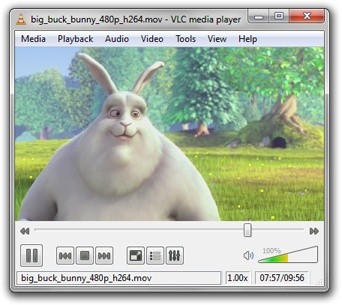
VLC media player 1.0.1


VLC media player is a highly portable multimedia player supporting most audio and video formats (H.264, Ogg, DivX, MKV, TS, MPEG-2, mp3, MPEG-4, aac, ...) from files, physical media (DVDs, VCD, Audio-CD), TV capture cards and many network streaming protocols.
It can also convert files, transcode and act as a streaming server over unicast or multicast and IPv4 or IPv6. It doesn't need any external codec, program or codec pack to work.

File Size: 17 MB

Download
Developer's Website

Digg Technorati Delicious StumbleUpon Reddit BlinkList Furl Mixx Facebook Google Bookmark Yahoo
ma.gnolia squidoo newsvine live netscape tailrank mister-wong blogmarks slashdot spurl

Wednesday, August 12, 2009

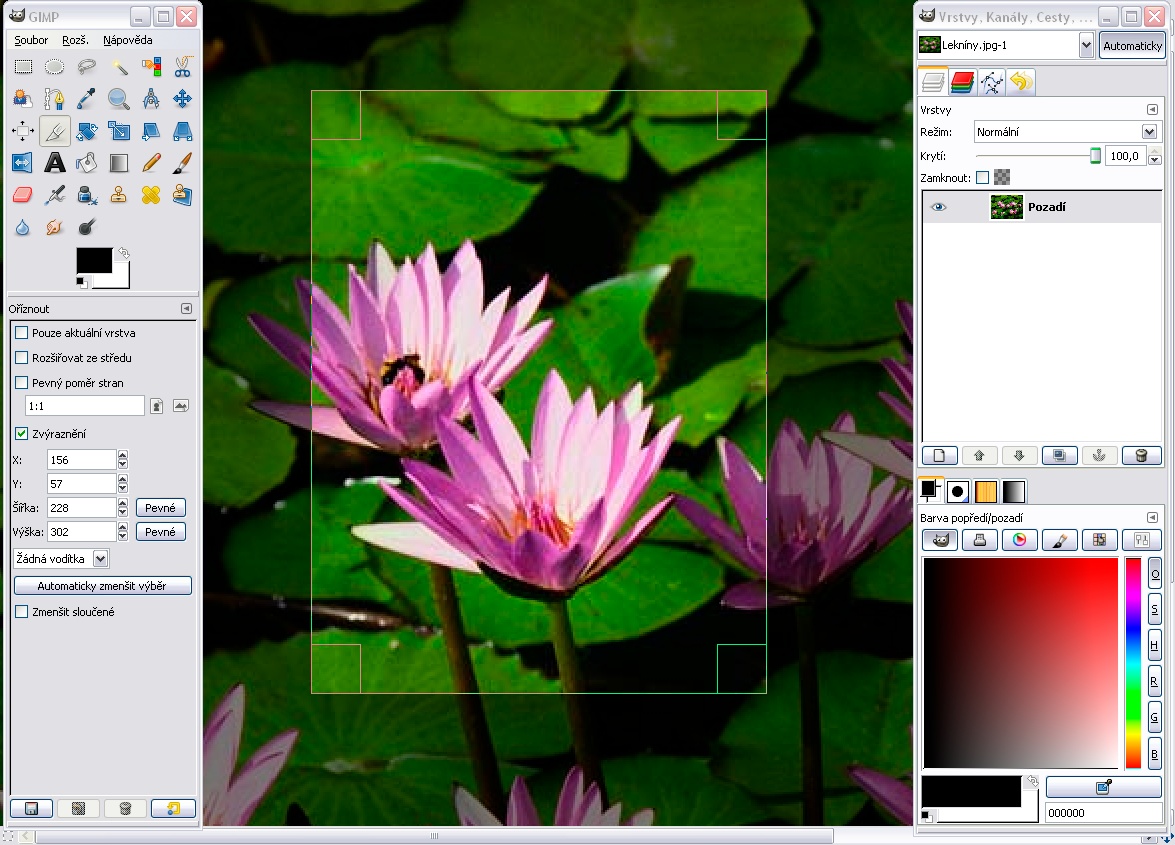
GIMP 2.6.6


GIMP is an acronym for GNU Image Manipulation Program. It is a freely distributed program for such tasks as photo retouching, image composition and image authoring.

It has many capabilities. It can be used as a simple paint program, an expert quality photo retouching program, an online batch processing system, a mass production image renderer, an image format converter, etc.

GIMP is expandable and extensible. It is designed to be augmented with plug-ins and extensions to do just about anything. The advanced scripting interface allows everything from the simplest task to the most complex image manipulation procedures to be easily scripted.

GIMP is written and developed under X11 on UNIX platforms. But basically the same code also runs on MS Windows and Mac OS X.

Features and Capabilities

This is only a very quickly thrown together list of GIMP features. You can also have a look at the illustrated features overview.

  • Painting
    • Full suite of painting tools including Brush, Pencil, Airbrush, Clone, etc.
    • Sub-pixel sampling for all paint tools for high quality anti-aliasing
    • Extremely powerful gradient editor and blend tool
    • Supports custom brushes and patterns
  • System
    • Tile based memory management so image size is limited only by available disk space
    • Virtually unlimited number of images open at one time
  • Advanced Manipulation
    • Full alpha channel support
    • Layers and channels
    • Multiple Undo/Redo (limited only by diskspace)
    • Editable text layers
    • Transformation tools including rotate, scale, shear and flip
    • Selection tools including rectangle, rounded rectangle, ellipse, free, fuzzy
    • Foreground extraction tool
    • Advanced path tool doing bezier and polygonal selections.
    • Transformable paths, transformable selections.
    • Quickmask to paint a selection.
  • Extensible
    • A Procedural Database for calling internal GIMP functions from external programs as in Script-fu
    • Advanced scripting capabilities (Scheme, Python, Perl)
    • Plug-ins which allow for the easy addition of new file formats and new effect filters
    • Over 100 plug-ins already available
  • Animation
    • Load and save animations in a convenient frame-as-layer format
    • MNG support
    • Frame Navigator (in GAP, the GIMP Animation Package)
    • Onion Skin (in GAP, the GIMP Animation Package)
    • Bluebox (in GAP, the GIMP Animation Package)
  • File Handling
    • File formats supported include bmp, gif, jpeg, mng, pcx, pdf, png, ps, psd, svg, tiff, tga, xpm, and many others
    • Load, display, convert, save to many file formats
    • SVG path import/export

OS requirements for GIMP: Win2000/XP/2003/Vista
File Size: 15 MB

Download
Developer's Website

Digg Technorati Delicious StumbleUpon Reddit BlinkList Furl Mixx Facebook Google Bookmark Yahoo
ma.gnolia squidoo newsvine live netscape tailrank mister-wong blogmarks slashdot spurl